The 7 principles of software testing, with examples
The seven principles of software testing are: testing shows the presence, not the absence of defects; exhaustive testing is impossible; early testing saves time and money; defects cluster together; tests wear out (the older name is the pesticide paradox); testing is context dependent; and the absence-of-defects fallacy. The standard foundation syllabus for testers lists them, and interviews ask about them. On a real shift nobody recites them. Each one is a question you ask before you decide what to test, because you never have time to test everything.
- 7 principles
- each one a question before you test
- 64,000,000
- combinations of one six-field page
- 9 of 14
- last month's bugs, all in one area
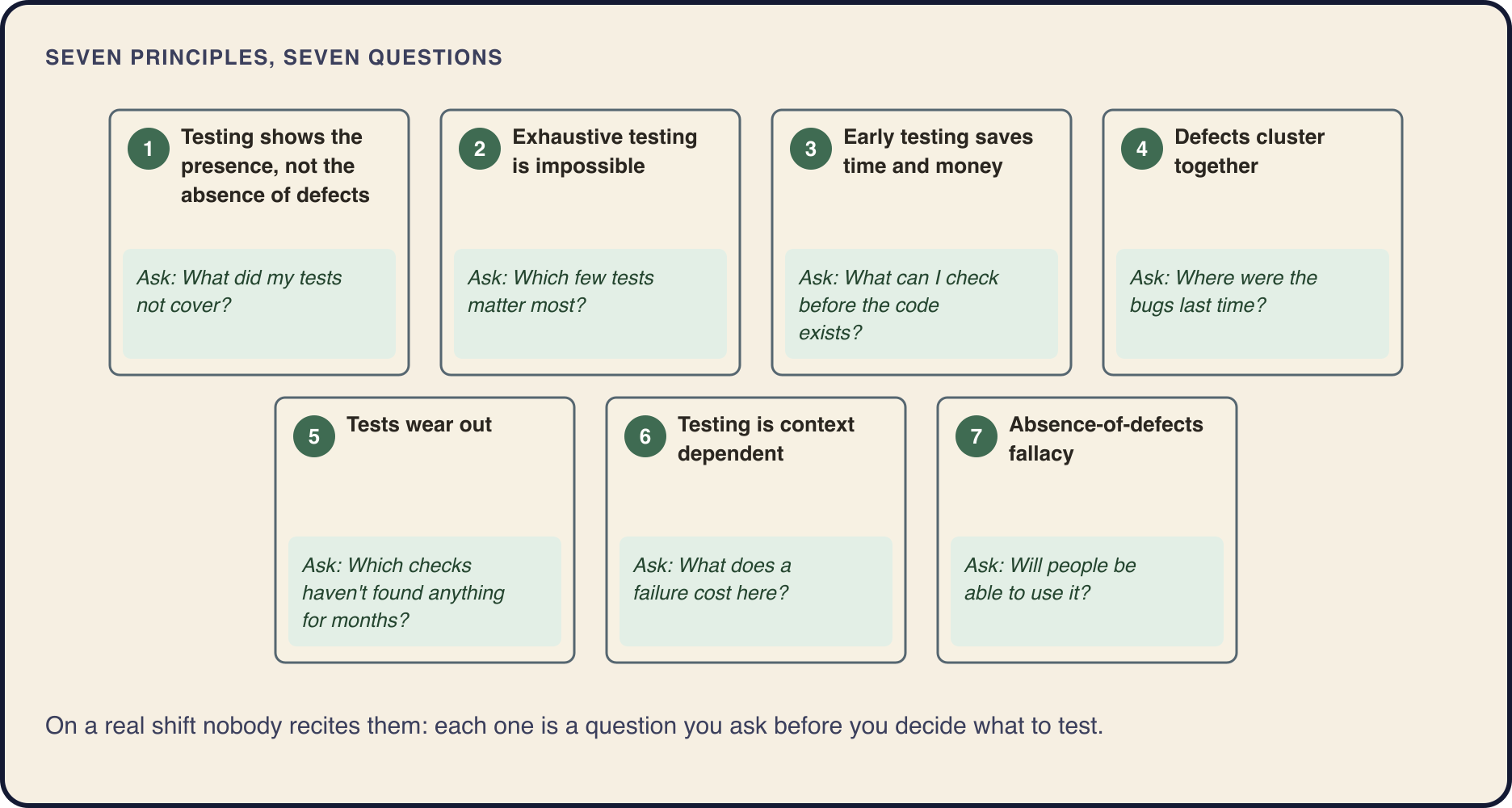
The seven principles at a glance
Here are the seven names as the syllabus gives them, what each one means, and the question it turns into when you are the one choosing what to test.
1. Testing shows the presence, not the absence of defects
A failed test proves a defect is there; passed tests only lower the chance one is hiding. Ask: what did my tests not cover?
2. Exhaustive testing is impossible
Except in tiny cases, there are more inputs and conditions than time. Ask: which few tests matter most?
3. Early testing saves time and money
A defect caught in a story or a design does not spread into code. Ask: what can I check before the code exists?
4. Defects cluster together
A few parts of a product usually hold most of its defects. Ask: where were the bugs last time?
5. Tests wear out
The same tests, repeated, find fewer and fewer new defects. Older name: the pesticide paradox. Ask: which checks haven't found anything for months?
6. Testing is context dependent
No single approach fits every system. Ask: what does a failure cost here?
7. Absence-of-defects fallacy
Meeting every requirement and fixing every defect found can still give people something they can't use. Ask: will people be able to use it?
Exhaustive testing is impossible, in numbers
A checkout page has six fields: country, delivery option, payment method, coupon, quantity and a gift message. Say each field has 20 values worth trying. Run every combination at one test per second, with no break for food or sleep, and you finish in about 741 days. That is more than two years for one page.
Testing is always a choice of a few combinations out of millions, and the first principle follows from it. If you ran a sample, finding nothing means only that this sample found nothing. One failed test shows that a defect is present. A thousand passed tests lower the chance that one is hiding, and that is all they can do. When someone promises zero bugs, the honest version is "zero bugs found by these checks".
The author has been asked to "test everything" before a release many times. The answer is never a plain no. It is "here is what I'll test first, and why".
6 fields × 20 values each
20 × 20 × 20 × 20 × 20 × 20 = 64,000,000 tests

At 1 test per second:
64,000,000 s ÷ 86,400 s per day ≈ 741 days

Time before the release: 2 hours
Defects cluster: where to test first on a release night
The release window in Shelf, the practice shop the author's courses use, opens in two hours. Two lists are on the desk: tonight's changelog and last month's bugs by area.
Nine bugs out of fourteen in one area is not bad luck. Defects cluster together, and a known cluster tells you where the next defect is likely to be. It illustrates the Pareto principle, the 80/20 rule: roughly 80% of consequences come from 20% of causes. Coupons are also on tonight's changelog. Add a third question: if it breaks, how much does it hurt? A wrong total takes money from customers. A typo in a footer link annoys a few people. Test first where change, past defects and harm meet.
The trap is treating the cluster as the only target. "Nine bugs in coupons, so we test only coupons" leaves the new currency selector with no tests at all. It has no bug history because nobody has used it yet, not because it is clean. A plan that gives coupons an hour, the currency selector 40 minutes, and photos and footer the last 20 minutes lets the cluster set the order and still leaves time for the rest.
Changelog tonight              Bugs last month
  coupon rules changed           coupons   9
  currency selector added        payment   3
    on product pages             search    2
  product photos compressed      photos    0
  footer link text corrected     footer    0

Order: coupon rules -> currency selector
       -> product photos -> footer text
Tests wear out, and early testing saves money
For a year, the same 15 checks of the coupon area ran before every release, with the same test data, and passed every time. Then a customer found a coupon bug those checks never reached. That is tests wearing out: most of the defects those checks could find were found long ago. Interviews still call it the pesticide paradox, after pests that grow resistant to one pesticide. Know both names.
The fix is to change the test data, update the old tests and add new ones. Keeping the same fixed data so that results stay comparable does not help against wear. The old checks still have a job: they show that nothing old broke, which is what regression testing is for.
Early testing is the cheapest principle to apply. Reviewing the coupon story before any code existed could have caught the missing limit at the cost of one sentence. It means testing stories and designs early, by whoever reads them, not only testers joining a project sooner.
Context, and the absence-of-defects fallacy
How deep you test depends on what the software does and what a failure costs. The software that sets the dose in a medical device gets written plans, independent reviews and every failure traced to its cause. The help pages of an online shop get a read-through and a check that the links open. Both teams are right. That is testing being context dependent.
The last principle catches teams that did everything by the book. The currency selector passed every line of its spec, and every defect found in it was fixed. The day after the release, support writes: customers can't find the selector on the product page. Closing the ticket because the spec is met would be the absence-of-defects fallacy. The useful move is to report a gap between the spec and people's needs and ask the product owner where customers look for it. Verification against the spec has to go together with validation against what people need.
Where to learn this


Questions and answers
What are the 7 principles of software testing?
Testing shows the presence, not the absence of defects; exhaustive testing is impossible; early testing saves time and money; defects cluster together; tests wear out; testing is context dependent; and the absence-of-defects fallacy.
What is the pesticide paradox in software testing?
The older name of the principle now called "tests wear out": the same tests, repeated with the same data, find fewer and fewer new defects. Change the test data, update old tests and add new ones.
Why is exhaustive testing impossible?
Because combinations multiply. Six fields with 20 values each give 64,000,000 combinations, about 741 days at one test per second. Testers choose a few tests by risk instead: what changed, where bugs were before, and what hurts most if it breaks.
What does "defects cluster together" mean?
A few parts of a product usually hold most of its defects. If 9 of last month's 14 bugs were in coupons, coupons get tested first. Other areas, especially new ones with no history yet, still get some of the time.
What is the absence-of-defects fallacy?
The belief that software is good because it meets every requirement and every defect found was fixed. It can still be something people can't use or don't need, so testers check it against people's needs as well as the spec.
If all tests pass, does that mean there are no bugs?
No. Testing shows the presence of defects, not their absence. Passing tests mean these tests found no failure; say what was checked and what was not.
More guides
- Start hereHow to become a software testerWhat a software tester does, what to learn and in what order, and how to practice without a job: six steps from zero to a small portfolio.
- Testing basicsWhat is software testing?Software testing in plain words: comparing what software does with what it should do, on purpose. Why it is important, what a software tester does on a working day, and the beginner myths to drop.
- Testing basicsExpected result vs actual resultWhat the expected and actual result are, how to write an expected result with its source, what to do when they differ or the spec is silent, and why matching the ticket is not always enough.
- Testing basicsQA vs QC vs testing: what is the difference?Quality assurance prevents defects, quality control and testing detect them, debugging fixes them. What each one means, who does it, and why testing is not the same as QA.
- Testing basicsExploratory testing with a charterWhat exploratory testing is, how to write a test charter, what to note during a time-boxed session and how to debrief, with a worked example on a shop's product page and cart.
- Bug reportsHow to write a bug reportThe fields of a bug report, a template to copy, a complete example from a practice shop, severity and priority with examples, and the mistakes that send a report back to you.
- Test casesHow to write test casesThe parts of a test case, a template, a complete example and its negative cases, the difference between a test case, a test scenario and a checklist, and how to fix a weak case.
- Test designBoundary value analysis and equivalence partitioning, with examplesHow to split inputs into equivalence partitions, pick boundary values with the 2-value and 3-value methods, and choose the step, worked through four fields of a practice shop.
- Bug reportsSeverity vs priority, with examplesWhat severity and priority mean, who sets each, the scales teams use, and all four combinations worked through on one practice shop, with a short answer for interviews.
- Test documentationTest case vs test scenario vs checklistWhat a test scenario, a checklist and a test case are, one shop feature written all three ways, when to use which, and how a scenario turns into checklists and test cases.
- Test designHow to test a login pageTest cases for a login page derived from partitions, a decision table, boundaries and states, plus the security checks every login page needs, worked through on a practice shop.
- API testingAPI testing with Postman: a beginner's guideHow to send your first requests in Postman, read the response, keep addresses and tokens in variables, test 401 and 403, add a status check and run a collection, on a practice shop's API.
- API testingHow to test a REST API manually: a checklistA manual REST API testing checklist without code: reading the OpenAPI documentation, status codes, body, headers, 401 versus 403, negative cases and state, with example requests to a practice shop.
- DatabasesSQL for testers: check what the app savedHow testers use SQL: the queries that check what an online shop saved after an order (order row, items, payments), SELECT, WHERE, GROUP BY and JOIN on a real schema, and the mistakes to avoid.
- Web testingChrome DevTools for testers: how to collect evidence for a bug reportWhich Chrome DevTools panels a tester needs and how to use them to collect the Console error, the request, the server's response and the storage values that make a web bug report reproducible.
- Test processSmoke vs sanity vs regression testingWhat smoke, sanity, regression testing and retesting usually mean, why teams use the names differently, how to ask on a new team, and how to choose the checks for a new build.
- Mobile testingHow to test a mobile appWhat breaks only on a phone, how to choose between an emulator, a simulator and a real device, how to read the app's log and its traffic through a proxy, and a checklist to start from.
See the first course
The full outline of every course is available: you can see each lesson before you start.