Expected result vs actual result
The expected result is what the software should do in a given situation, worked out from a source such as the spec or the ticket before you look at the software. The actual result is what the software really does. Testing compares the two: if they match, the check passes; if they differ, you report the difference or ask about it. Write the expected result first and name its source, because once you have seen the screen, what you saw starts to look like what you expected.
- Before you look
- the expected result is written first
- 1 source
- named next to every expected result
- 2 questions
- does it meet the spec, does it meet the need

How to write an expected result, step by step
- Step 1
Find the source
Take the spec, the ticket or the agreed rules for the feature. Testers call this source the test basis. Pick the one line that covers the situation you are about to test.
- Step 2
Work out the result
From that line and your test data, work out what the screen should show: a number, a list, a message, a state. Do the arithmetic yourself; do not leave it to the software.
- Step 3
Write it down with its source
For example: "Expected (coupon rule): Total USD 23.00." Write it before you press anything, in words someone else can check.
- Step 4
Run and record the actual result
Do the action and write what the software shows, in concrete terms. "Looks fine" is not a result.
- Step 5
Compare and decide
Same: the check passes. Different: report it, or ask about it if you are not sure which side is wrong.
Expected and actual result in one search
Shelf, the practice shop the author's courses use, has a written rule for its search: "Results show products whose name or brand contains the whole search text, ignoring upper and lower case." Its catalog holds 9 kettles and 7 bikes.
You are about to type KETTLE into the search box. Stop before you press Enter: what should appear? Case is ignored, so KETTLE, kettle and Kettle are the same search. Every product with "kettle" in its name or brand should be in the results: Steel kettle 1.7 l and the other 8 kettles, 9 in all. That is the expected result. Now press Enter. What the shop shows is the actual result. Then you compare.
Search      Expected (search rule)            Actual                       Verdict
KETTLE      all 9 kettles in the catalog      9 kettles, Steel kettle      pass
                                              1.7 l among them
Hearthline  the 3 products with Hearthline    those 3, plus Steel kettle   difference:
            in their names                    1.7 l                        check the spec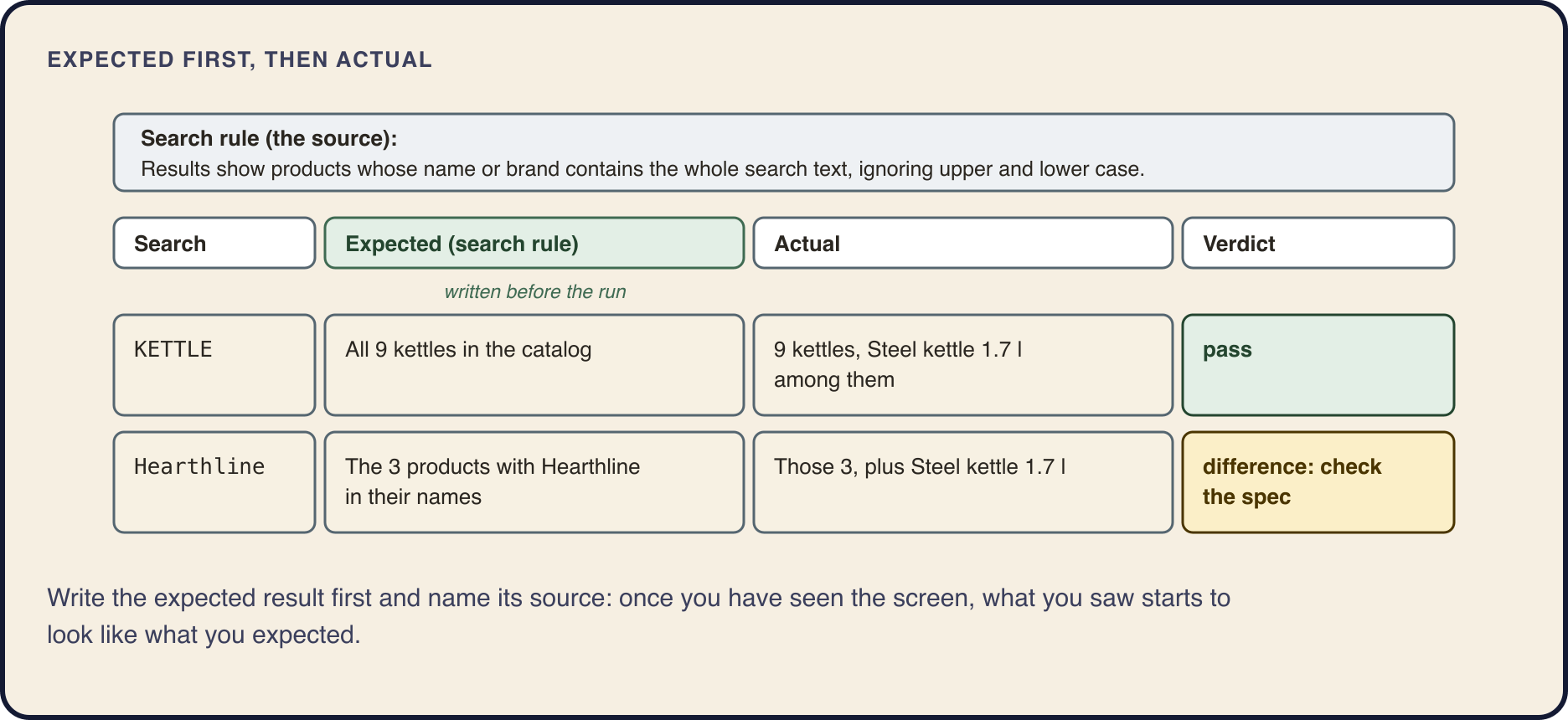
Why the expected result comes first
Once you have seen the screen, what you saw becomes what you "expected". It happens to everyone, the author included. Eight kettles appear, you nod, and only later do you realize that you never checked how many kettles the shop sells. If "all 9" is written down first, a list of eight looks wrong at once.
A difference is not always a bug in the software. Look at the second row above. The rule says name or brand, and Steel kettle 1.7 l is a Hearthline product, so the shop is right and the expectation was wrong. Sometimes the spec can be read two ways. Either way, you do not keep a difference to yourself: you check, then you report it or ask about it.
What a useful expected result looks like
Shelf's coupon rule says: "Coupon SAVE25 takes USD 25.00 off the cart subtotal. A cart holds one coupon, applied once." Steel kettle 1.7 l costs USD 24.00 and ships free. Here is a test note for a cart where the tester presses Apply twice.
Compare it with a note that says only "Coupon: looks fine." Both may describe the same check, but only the first one lets someone else see what was expected, where that came from, and whether the verdict holds. A week later, when a customer complains, that is the note the team can use.
Cart: 2 × Steel kettle 1.7 l at USD 24.00 (ships free)
Steps: type SAVE25, press Apply, press Apply again

Expected (coupon rule: USD 25.00 off, applied once):
  48.00 − 25.00 = Total USD 23.00
Actual: Total USD 0.00
Verdict: different from the spec. Report it.
Concrete
A number, a list, a message, a state. "Total USD 23.00", not "the total is correct".
Sourced
The rule, ticket or feature it comes from, named in the note.
Written before the run
Otherwise the screen writes it for you.
Observable
Something you can see on the screen or in the data, not a feeling about the page.
When the spec is silent, or wrong
You press Enter in Shelf's search box without typing anything. The shop shows every product it has, 12 per page. Pass or fail? None of the search rules talks about an empty search. This happens all the time: a spec describes what someone thought about, and nobody thinks about everything.
"If the spec doesn't mention it, anything goes" is the wrong conclusion. The expectation has to come from another source, and you name it. The coupon field in the same cart answers an empty code with "Enter a coupon code." Going by that source, the expected result is a message, so the empty search is a difference. It is not a pass, and it is not yet a bug: it goes to the product owner as a question.
Specs can also be wrong. A rule can contradict another rule, or describe something customers will not want. Read the spec as carefully as the screen.
A similar feature
How another part of the same product handles the same case.
What is normal for the domain
In online shops, a search for nothing finds nothing or asks you to type a word.
A person
Ask the product owner. If you can name no source at all, you have a question, and a question is a good thing to report.
When it matches the ticket but fails the customer
A ticket says: "Reorder repeats the customer's last order." You press Reorder. The shop places the same order again and charges the saved card straight away. Expected, per the ticket: the last order is repeated. Actual: it is repeated. By the method above, this passes. Yet customers who press it expected their last items to land in the cart, so they could change a size or remove something before paying.
Testing asks two questions here. Verification: does the product meet its spec? Reorder does. Validation: does it meet the needs of the people who use it? For many customers, it does not. Interviewers often put it as "are we building the product right" and "are we building the right product". The two can fail separately.
You do not mark Reorder passed, and you do not decide alone that the spec is wrong. You write it up as a question for the product owner: the spec says this, customers expect that, which one do we want? Raised while the spec is still a draft, the same question costs a sentence.
Where to learn this


Questions and answers
What is the difference between expected result and actual result?
The expected result is what the software should do, worked out from a source such as the spec before you run anything. The actual result is what it really does. A test compares the two.
What is an example of an expected result in testing?
A cart holds 2 kettles at USD 24.00 and the coupon rule takes USD 25.00 off. Expected (coupon rule): Total USD 23.00. If the cart shows USD 0.00, that is the actual result, and the difference goes into a report.
How do you write an expected result in a test case?
Make it concrete and observable (a number, a message, a list), name its source in brackets, and write it before you run the step. "Expected (search rule): all 9 kettles" can be checked by someone else; "works fine" cannot.
What do you do when the expected and actual results are different?
First check that your expectation was right: reread the spec. If the software is wrong, report it. If the spec can be read two ways, or you are not sure which side is wrong, ask the product owner.
Where does the expected result come from if there is no spec?
From another source you can name: a similar feature in the same product, what is normal for that kind of software, or a person who decides, usually the product owner. With no source, it is a question.
What is the difference between verification and validation?
Verification checks that the product does what its spec says. Validation checks that it meets the needs of the people who use it. A feature can pass one and fail the other.
More guides
- Start hereHow to become a software testerWhat a software tester does, what to learn and in what order, and how to practice without a job: six steps from zero to a small portfolio.
- Testing basicsWhat is software testing?Software testing in plain words: comparing what software does with what it should do, on purpose. Why it is important, what a software tester does on a working day, and the beginner myths to drop.
- Testing basicsQA vs QC vs testing: what is the difference?Quality assurance prevents defects, quality control and testing detect them, debugging fixes them. What each one means, who does it, and why testing is not the same as QA.
- Testing basicsThe 7 principles of software testing, with examplesThe seven testing principles under the names interviewers use, each with a worked example from a release night: exhaustive testing, defect clusters, the pesticide paradox and the rest.
- Testing basicsExploratory testing with a charterWhat exploratory testing is, how to write a test charter, what to note during a time-boxed session and how to debrief, with a worked example on a shop's product page and cart.
- Bug reportsHow to write a bug reportThe fields of a bug report, a template to copy, a complete example from a practice shop, severity and priority with examples, and the mistakes that send a report back to you.
- Test casesHow to write test casesThe parts of a test case, a template, a complete example and its negative cases, the difference between a test case, a test scenario and a checklist, and how to fix a weak case.
- Test designBoundary value analysis and equivalence partitioning, with examplesHow to split inputs into equivalence partitions, pick boundary values with the 2-value and 3-value methods, and choose the step, worked through four fields of a practice shop.
- Bug reportsSeverity vs priority, with examplesWhat severity and priority mean, who sets each, the scales teams use, and all four combinations worked through on one practice shop, with a short answer for interviews.
- Test documentationTest case vs test scenario vs checklistWhat a test scenario, a checklist and a test case are, one shop feature written all three ways, when to use which, and how a scenario turns into checklists and test cases.
- Test designHow to test a login pageTest cases for a login page derived from partitions, a decision table, boundaries and states, plus the security checks every login page needs, worked through on a practice shop.
- API testingAPI testing with Postman: a beginner's guideHow to send your first requests in Postman, read the response, keep addresses and tokens in variables, test 401 and 403, add a status check and run a collection, on a practice shop's API.
- API testingHow to test a REST API manually: a checklistA manual REST API testing checklist without code: reading the OpenAPI documentation, status codes, body, headers, 401 versus 403, negative cases and state, with example requests to a practice shop.
- DatabasesSQL for testers: check what the app savedHow testers use SQL: the queries that check what an online shop saved after an order (order row, items, payments), SELECT, WHERE, GROUP BY and JOIN on a real schema, and the mistakes to avoid.
- Web testingChrome DevTools for testers: how to collect evidence for a bug reportWhich Chrome DevTools panels a tester needs and how to use them to collect the Console error, the request, the server's response and the storage values that make a web bug report reproducible.
- Test processSmoke vs sanity vs regression testingWhat smoke, sanity, regression testing and retesting usually mean, why teams use the names differently, how to ask on a new team, and how to choose the checks for a new build.
- Mobile testingHow to test a mobile appWhat breaks only on a phone, how to choose between an emulator, a simulator and a real device, how to read the app's log and its traffic through a proxy, and a checklist to start from.
See the first course
The full outline of every course is available: you can see each lesson before you start.